
Case study · Telecommunications
KCI Telecommunications
Contractor Reporting Portal for a Telecom Provider
KCI Telecommunications places skilled contractors on a large carrier's sites and bills for their time. Its in-house data portal could not keep up as the work grew. We took over the code, fixed what was urgent, then rebuilt the portal in Laravel: a daily work log contractors fill out from a tablet, role and market based access for the customer's managers, task-level approval before billing, and a QuickBooks timesheet export.
Overview
KCI Telecommunications supports telecom networks for carriers and businesses across the country: legacy infrastructure, network upgrades, migrations to newer platforms, and skilled contractors placed on customer sites.
In early 2017 KCI brought us the data portal it used to manage contractor work for a large carrier customer. Contractors logged their daily work in it, the customer's managers requested new contractors through it, and KCI's back office billed from it. We took over the existing code, fixed what was urgent, then rebuilt the portal in Laravel and supported it through the end of the year.
Working with the Team at Caffeine was great! They really listened to what we needed and were very responsive. Their suggestions helped us stay within budget and in the end, produced a user friendly online tool that gives us a competitive advantage in our market.
Jarred Worth, KCI Telecommunications
The Challenge
The original portal was a small PHP application built in-house, with no source control. It worked while KCI served one market. As KCI placed more contractors in more locations, the volume of reports outgrew it, and each new request from the customer meant another patch.
The customer's managers needed to see who worked at which site, on what, and for how many hours, so they could account for the spend. KCI's back office needed the same hours to invoice from, and was copying them into QuickBooks by hand. Every hour had to be right, approved and billed once.
What We Built
First, the portal they already had
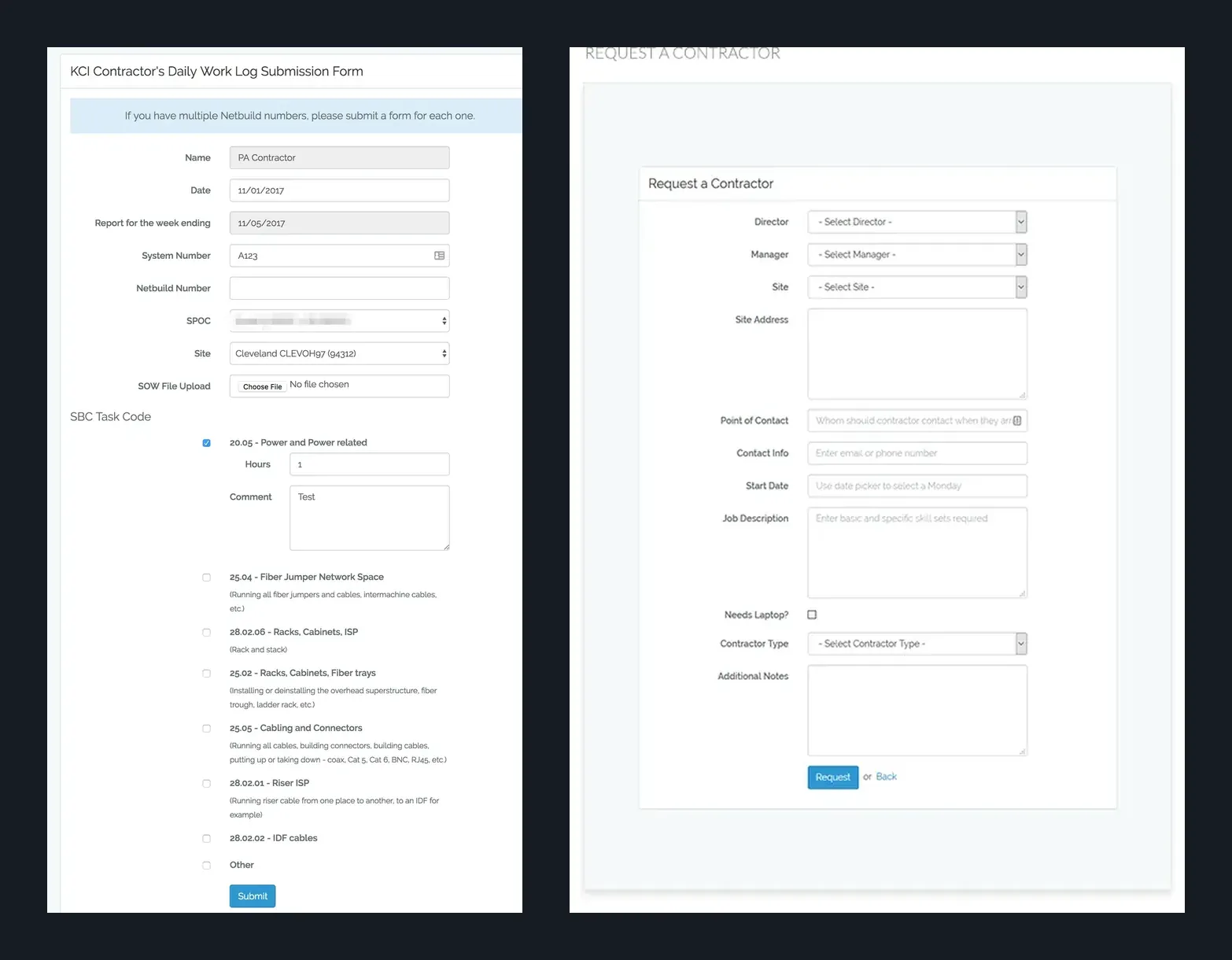
We put the existing code under source control with a staging copy and worked through a punch list from KCI and the customer's managers: a Request a Contractor form, labels changed to the customer's own terms, Excel and CSV exports, end dates that roll to the Sunday that closes the work week, and a weekly job that carries active jobs into the next week so no one has to recreate them by hand.
A rebuild in Laravel
In April 2017 we started the new portal in Laravel, with data models based on the old portal but cleaned up to support more than one client company. We used the existing screens as the reference and moved them to a responsive Bootstrap interface, so users recognized every page. The new portal went live on KCI's own server in June, with Jenkins deploying to staging and production.
A daily work log contractors can fill out from a tablet
When contractors log in, they see one thing: the daily work log. They pick the site, enter a job number or system number, and check each task code they worked, with hours and a comment for each. The week-ending date fills itself in, and they can attach the statement of work. We tested the form on iPad and Kindle Fire tablets as well as desktop browsers.
Roles that match the customer's organization
Directors, managers, the customer's single points of contact (SPOCs) and contractors each see only what they should. Users belong to a market, and sites, contacts and reports are filtered to it. A dashboard shows managers and directors the last seven days of work from their contractors, and a request for a new contractor can notify the requester's supervisor, depending on role.
Approval before billing
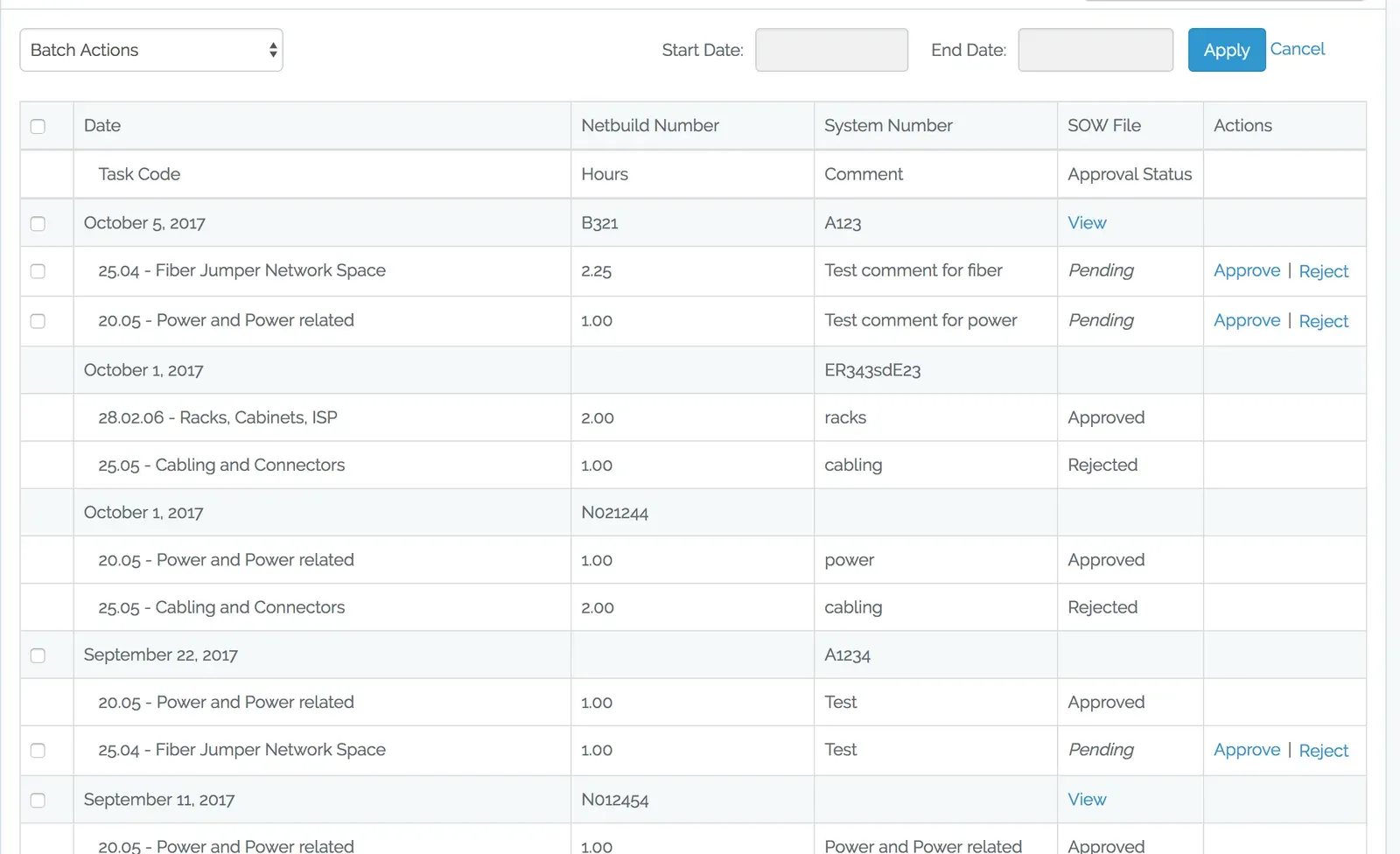
Every task line starts as pending. A SPOC, manager or director approves or rejects it, one line at a time or in a batch. A rejection needs a reason, which the contractor sees before fixing the entry and resubmitting. Approval emails are grouped into a single notification where possible, instead of one per line.
Exports that feed QuickBooks
Filtered Excel and CSV exports put each task code on its own line with hours and comments, by site, week and contractor. Admins export approved hours as a QuickBooks timesheet import file, and exported records are flagged so the next export skips them.
Results
- The portal moved from an in-house script to a Laravel application on KCI's server in about two months.
- Contractors log hours by task, and the customer's managers approve them before anything is invoiced.
- Approved hours go into QuickBooks as an import file instead of being retyped.
- Reports filter and export by site, week and contractor, scoped to each user's market.