
Case study · Construction
O&S Construction
Job Costing App for a Roofing Contractor
O&S Construction ran its roofing jobs across PlanSwift, spreadsheets, AccuLynx and QuickBooks, rekeying the same data at every step. We wrote the specification and built a Laravel app that imports the takeoff, generates budget sheets and numbered purchase orders, sends orders to suppliers, crews, QuickBooks and the shop, and tracks estimated against actual cost.
Overview
O&S Construction is a commercial roofing and sheet metal contractor in Houston, Texas. Its jobs include multi-family communities with many buildings, each with its own roof types, gutters and trim.
In 2017 we built O&S a web application that runs each job from estimate to billing. It takes the takeoff from their estimating software, turns it into budgets and orders, numbers every purchase order, and passes the results to QuickBooks and to the crews and shop. We wrote the specification and wireframes, built the app on Laravel, and launched it that fall.
The Challenge
O&S estimated in PlanSwift, then ran the job across Excel spreadsheets, AccuLynx and QuickBooks, none of which talked to each other. Budget sheets were run one trade and one building type at a time, and rerun every time a markup changed. Material and labor orders were keyed by hand into AccuLynx, which also issued their job and PO numbers.
The details were specific to roofing. Shingles are ordered in bundles but estimated by the square. Manufacturers pay rebates per square. Some items are fabricated in O&S's own shop from flat sheet metal, so their cost depends on the sheet and the hours of the tech who made them. Builders pay against a schedule of values and a monthly percent complete for each building, so billing depended on knowing where every building stood.
What We Built
Process review and specification
We started by working through each step with O&S, from takeoff to billing, and each spreadsheet and form it produced. That became a written specification and wireframes, which we kept updated through the build as walkthroughs with the O&S team turned up changes.
From takeoff to budget
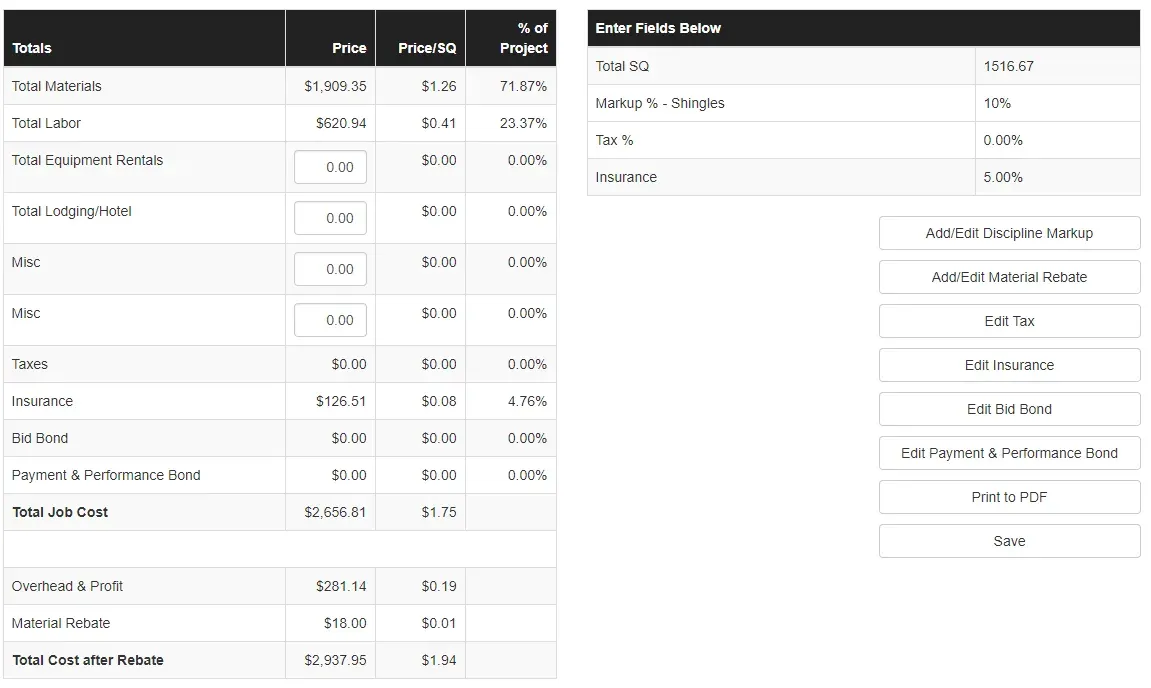
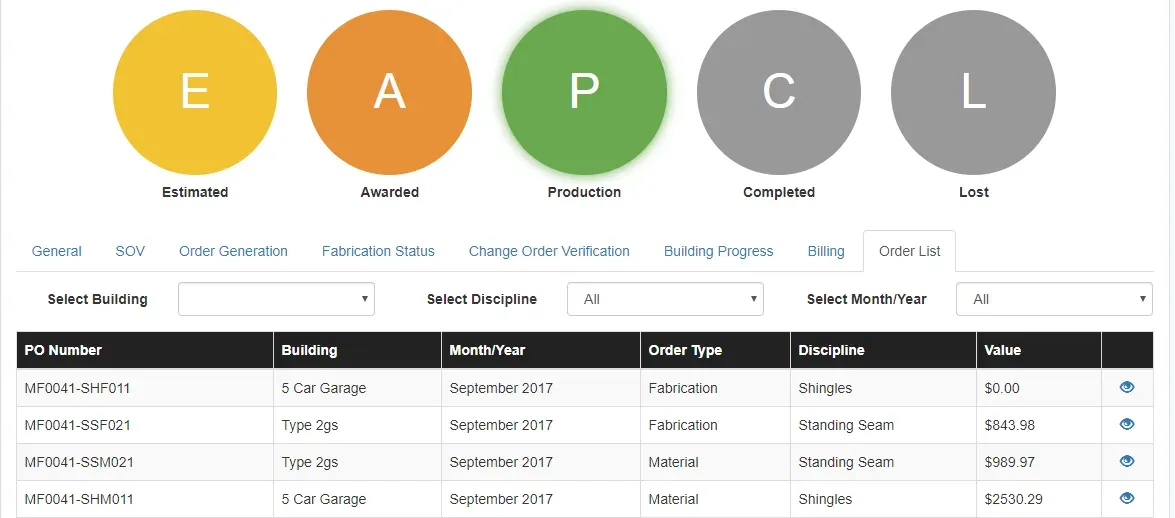
A project is created by importing the PlanSwift export and assigning each building number to a building type. The app generates budget sheets for any building and discipline, with markup, tax, insurance, bonds, overhead and profit, and material rebates, and prints them to PDF. Each project moves through five statuses, estimated, awarded, production, completed and lost, and shows only the tabs that fit its stage.
Orders in three picks
To place an order, the user picks a building, an order type and a discipline, and the app pulls in every matching item from the estimate. Material, labor, fabrication, equipment and lodging orders each get a generated PO number built from the project type and ID, discipline, order type and building. Changes to an order get a suffixed number. Orders go to suppliers by email with a PDF, and labor orders can go to crews by text message with a download link.
QuickBooks and FastField
Orders and labor draws are sent to QuickBooks Online as purchase orders, at the moment they are sent. We connected FastField, the mobile forms app O&S's shop and field crews use. Sending a fabrication order to the shop dispatches a work order to their phones, and the hours each tech logs come back into the app as labor cost per item. Change orders submitted from the field arrive for review, and approved ones flow into the schedule of values. When a building reaches 100 percent, the app dispatches the completion report.
Progress, billing and reports
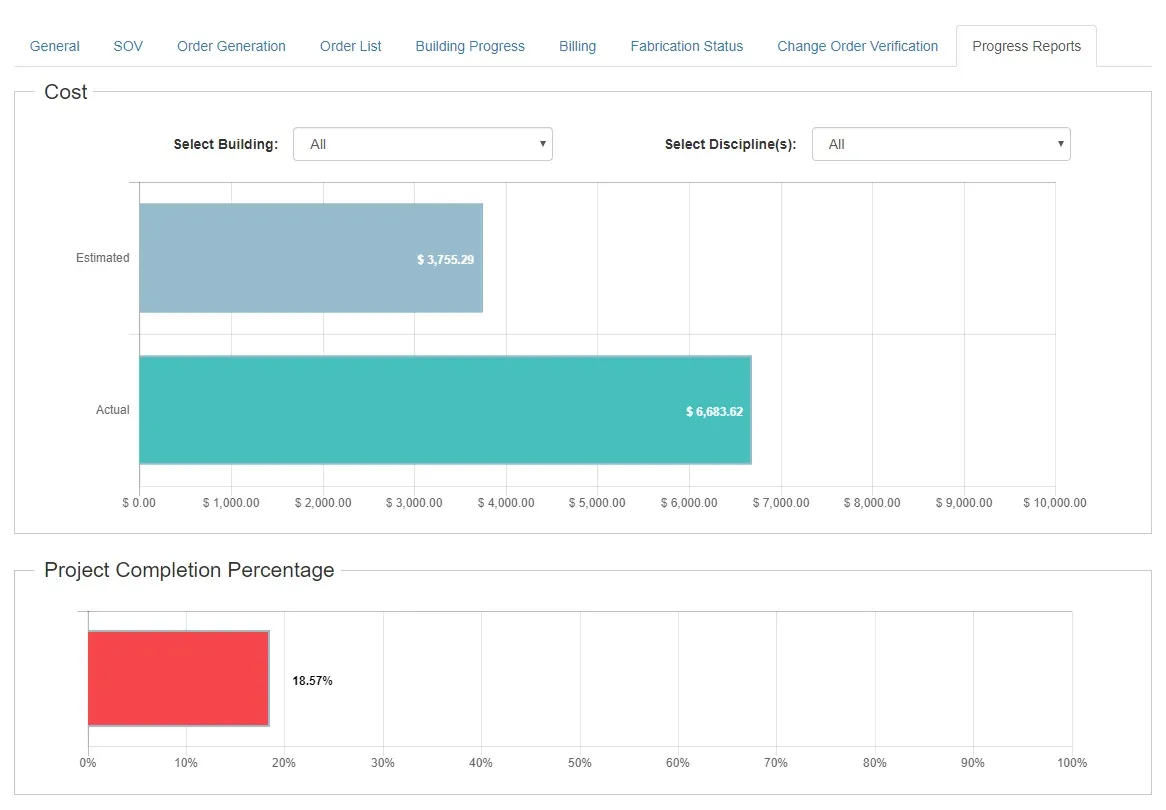
Building progress is tracked by building and discipline each month, feeding the billing tab. A progress report charts estimated against actual cost and the project's percent complete. Reports for supplier and manufacturer rebates, warranties, budget overages, change orders and job cost comparison export to Excel.
Results
- One system for the job from estimate to billing, with a single PlanSwift import at the start instead of rekeying.
- PO numbers generated from the order itself, so O&S no longer needed AccuLynx to issue them.
- Purchase orders in QuickBooks as they are placed, and shop hours from FastField priced into each fabricated item.
- Estimated versus actual cost visible on every project, and rebate, warranty and overage reports that export to Excel.